AI messages
Let AI handle your opening lines and conversation replies. Generate personalized, engaging messages that match your style and get responses—automatically powered by advanced OpenAI GPT technology.
How it works
AI-powered messaging in three simple steps
Configure your style
Choose your messaging tone (casual, professional, playful, flirty), preferred length, and add custom instructions for personalization
AI reads the profile
Advanced AI reads match profiles (bio, interests, conversation history) and generates contextually relevant messages in the correct language
Send & track
Messages are sent to your matches automatically. Follow them in your dashboard's message history and analytics
Powerful AI features
Profile-aware generation
AI analyzes bio, interests, age, location, and conversation history to create highly relevant, personalized messages that reference actual profile details.
Multi-language support
Automatically detects and responds in the same language as the match profile—English, German, French, Italian, Swiss German, and more.
Customizable tone & style
Choose from casual, professional, playful, or flirty tones. Set message length (short, medium, long) and add custom instructions for each message number.
Prompt injection protection
Advanced security measures sanitize all inputs to prevent prompt injection attacks, ensuring safe and reliable message generation.
Fast response times
Powered by OpenAI GPT with optimized performance. Messages generate in ~1-3 seconds.
Detailed analytics
Track messages sent, success rate, response times, tokens used, platform breakdown, and view complete message history with filtering options.
How AI messages work
Every AI message you send counts once. Pro and Ultimate include AI messages every month, and you can buy more
Monthly AI messages
Included with Pro and Ultimate subscription
- 150 AI messages a month on Pro, 250 on Ultimate
- Your monthly AI messages renew every month
- Monthly AI messages are used first, then bought ones
- Perfect for moderate usage
Buy more AI messages
One-time purchases for heavy users
- Buy AI messages in packs from $4.99
- Bought AI messages never expire
- Several pack sizes to choose from
- Secure Stripe payment processing
Buy AI messages in packs whenever you need more. See the packs and buy them at app.auto-swiper.ch/messaging
Intelligent automation
AI automatically handles your conversations with smart conversation management
Fully automated messaging
AI handles everything from opening messages to multi-turn conversations
What it does:
- Automatically messages new matches with personalized opening lines
- Replies to conversations when matches respond
- Waits for match's reply before sending next message
- Adapts each message based on conversation context
Smart features:
- Prevents double-messaging (waits for their reply)
- Respects max messages per conversation limit
- Configurable delays for human-like timing
- Batch control to avoid overwhelming users
How it works
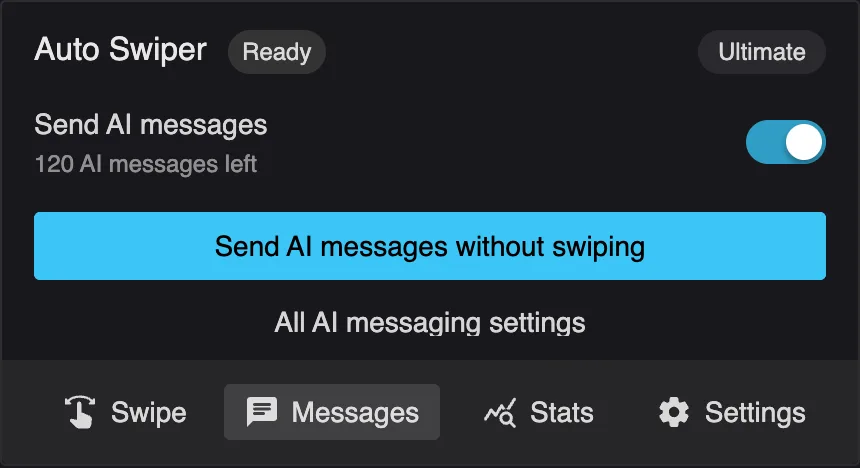
Turn on "Also send AI messages" in the extension popup, set your preferences under Settings → AI messaging, and the AI will automatically handle conversations during your swiping sessions. To message without swiping, open the Messages tab and click "Send AI messages without swiping". The system checks for new matches and replies at configurable intervals (1-120 minutes), ensuring natural engagement without spam.
Manual mode: AI messages on demand
Generate AI messages instantly without running Auto Swiper automation
AI at your fingertips
Click the AI button next to the message box on Tinder, Lovoo or Badoo to generate a message on demand
Perfect for:
- Testing your AI settings before enabling full automation
- Experimenting with custom prompts and seeing results instantly
- Crafting perfect replies during active conversations
- Maintaining control while using AI assistance
How it works:
- An AI button appears next to the message box
- Click it to generate a contextual message
- AI analyzes profile and conversation history
- Review, edit, or regenerate before sending
Same powerful features
Manual mode uses the same AI engine, settings and AI messages as automatic messaging. All your tone preferences, instructions, and per-message instructions apply—giving you full control with instant results.
Advanced configuration
Write to new matches - Automatically send first messages to new matches
Reply to conversations - Continue multi-message conversations automatically
Max messages per conversation (1-20) - Set conversation depth limits to prevent over-messaging
Different instructions per message - Customize instructions for messages 1-20 individually
Use match profile - Choose whether to include bio and interests in prompts
Check interval (1-120 min) - How often to scan for new matches and replies in automated mode
Delay between messages (0-30 sec) - Add human-like delays for natural pacing
New matches and max replies per round - Control how many new matches and conversations to message per automation round
Frequently asked questions
Get answers to common questions about this feature
Still have questions?
Our support team is here to help you get the most out of Auto Swiper
Start messaging smarter with AI
Upgrade to Pro or Ultimate and get up to 250 AI messages per month. Let AI handle the hard part while you focus on genuine connections.
Up to 250 AI messages a month • Powered by OpenAI GPT • 10-day refund window